
Verify local pour limits first
Before selecting or installing any automated dispensing hardware, you must determine the legal pour size and frequency limits for your specific jurisdiction. Federal guidelines often differ from state or municipal codes, and relying on default settings can lead to immediate compliance failures.
Pour limits are the foundation of any regulated mixing system. If your state mandates a standard drink size of 1.5 ounces for spirits, your hardware must be calibrated to dispense exactly that amount. Deviating from this limit, even by a fraction, can constitute a violation of alcohol control laws. Some jurisdictions also impose strict limits on the number of drinks served per transaction or per hour, which requires specific software configurations to enforce.
Consult your state’s alcohol beverage control board or local municipal code directly. Do not rely on third-party vendor claims about "universal compliance." Official documentation will specify whether your jurisdiction uses fluid ounces, metric milliliters, or standard drink equivalents. Once you have the exact legal parameters, you can proceed to configure your hardware with confidence.
Select hardware with audit trails
Choosing the right regulated mixer requires looking past mixing capacity to the integrity of the data logging system. In 2026, liability protection depends on immutable logs that record every pour with a timestamp, operator ID, and volume. If a device cannot prove exactly what was dispensed and when, it does not meet compliance standards.
When evaluating models, verify that the hardware stores logs locally in non-editable memory before syncing to a central server. This prevents tampering during network outages. Ensure the device integrates directly with your point-of-sale or inventory system to eliminate manual entry errors that often trigger compliance violations.
The following comparison highlights the technical differences between compliant and non-compliant hardware options.
Calibrate pour volumes precisely
In regulated environments, a fraction of an ounce can mean the difference between compliance and a citation. Calibration ensures that every dispense matches your jurisdiction’s legal pour size—typically 1.25 oz or 1.5 oz of liquor—without over-pouring. This step is not optional; it is the primary mechanical control for liability management.
Follow this sequence to set and verify your dispenser’s volume limits.
Locate the physical access switch or digital admin code on your dispenser. Most compliant units require a specific key sequence (e.g., holding the dispense button for three seconds) to enter programming mode. If your dispenser lacks a visible admin lock, consult the manufacturer’s compliance manual for the default override code. Failure to secure this menu prevents unauthorized changes later.
Navigate to the volume settings. Input the exact legal limit for your jurisdiction. For example, if your state mandates 1.5 oz for spirits, enter 1.5. Do not round up or guess. Some units allow separate programming for beer, wine, and liquor; ensure the spirit line is set to the highest legal threshold to prevent accidental over-pours during peak service.
Trigger a single dispense into a calibrated measuring glass. Do not dispense directly into a bar glass for this test, as the shape of the serving vessel affects surface tension and reading accuracy. Use a graduated cylinder or a dedicated bar scale with a tared vessel. Watch the flow stop immediately when the target volume is reached.
Weigh the dispensed liquid. Since 1 oz of ethanol weighs approximately 0.78 oz, convert your volume requirement to weight if your scale does not display fluid ounces. For a 1.5 oz pour, the weight should be roughly 1.17 oz. If the dispense is consistently off by more than 2%, adjust the pulse width or duration in the admin menu and repeat the test. Document the final weight for your compliance logs.
Exit the admin menu and engage the physical or digital lock. Many jurisdictions require that pour controls cannot be adjusted by bartenders during service. If your unit has a physical key switch, ensure it is in the locked position. This prevents staff from overriding the calibrated limits to speed up service, which is a common cause of liability claims.
Integrate with point-of-sale systems
Connecting your regulated mixer to the bar’s point-of-sale (POS) system transforms the dispenser from a passive tool into an active compliance checkpoint. This integration automates age verification triggers and ensures that every transaction is logged with precise legal accuracy, significantly reducing the risk of manual reporting errors.
Train staff on compliance protocols
Automated systems are reliable, but they are not infallible. Bartenders must be trained to recognize when a system override is necessary and strictly permitted. This training is not optional; it is a legal safeguard for both the employee and the establishment. Staff must understand that manual intervention is a high-stakes action that leaves a permanent digital footprint.
Training must cover two distinct areas: authorized override procedures and mandatory audit logging. Employees should only override systems in specific, documented scenarios, such as hardware failures or verified age discrepancies that the scanner cannot resolve. In these cases, the staff member must follow a strict protocol: verify identity manually, record the override reason, and ensure the transaction is flagged for management review.
Logging manual adjustments is the primary defense during an audit. Every override must be timestamped and linked to the specific employee ID. Regulators scrutinize these logs to detect patterns of negligence or intentional circumvention. Staff must be instructed to never bypass logging steps, even if it saves time. A missing log entry is often treated as a compliance violation in itself.
Use this checklist to verify your training program covers these essentials:
- Verify ID scanning integration is active and tested daily.
- Practice override procedures under simulated failure conditions.
- Review daily audit logs together to reinforce accountability.
Failure to train staff properly exposes the business to severe penalties. Regular refresher courses ensure that compliance remains a habit, not just a policy.
Common regulated mixer mistakes
Even with a certified device, operational errors can void compliance. Facilities often treat regulatory standards as a one-time installation check rather than an ongoing maintenance requirement. This section outlines the most frequent violations that lead to citations or safety failures.
Ignoring software and firmware updates
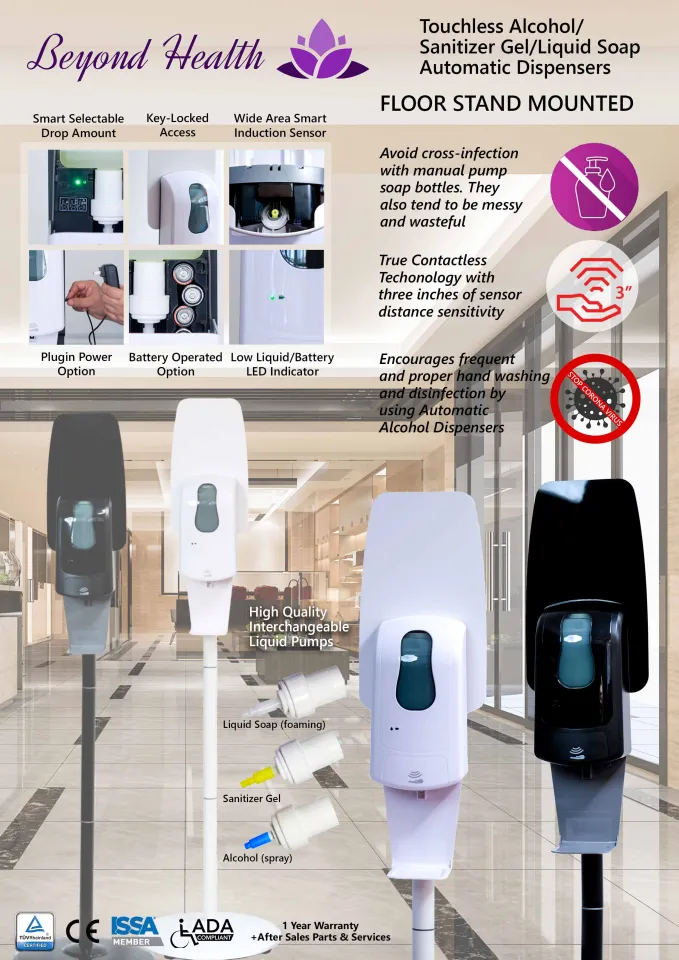
Touchless dispensers rely on software to manage sensor sensitivity and dosage volume. Many facilities ignore manufacturer update notifications, leaving devices vulnerable to calibration drift or security gaps. An unpatched system may dispense incorrect volumes, leading to waste or insufficient sanitization. Regularly applying firmware updates ensures the device adheres to current safety protocols and data security standards.
Failing to secure admin passwords
Default admin passwords are a primary entry point for unauthorized configuration changes. If an operator resets the dosage settings or disables the sensor timeout, the device may no longer meet regulatory volume requirements. Always change default credentials immediately upon installation and enforce strong password policies. This simple step prevents accidental or malicious tampering that could compromise public health safety.
Skipping routine maintenance schedules
Regulatory compliance depends on consistent operational performance. Skipping scheduled cleaning or part replacement can lead to nozzle clogs or sensor failures. A clogged nozzle might dispense too little sanitizer, failing to meet the required contact time for pathogen elimination. Maintain a strict log of all maintenance activities to demonstrate due diligence during audits.
No comments yet. Be the first to share your thoughts!